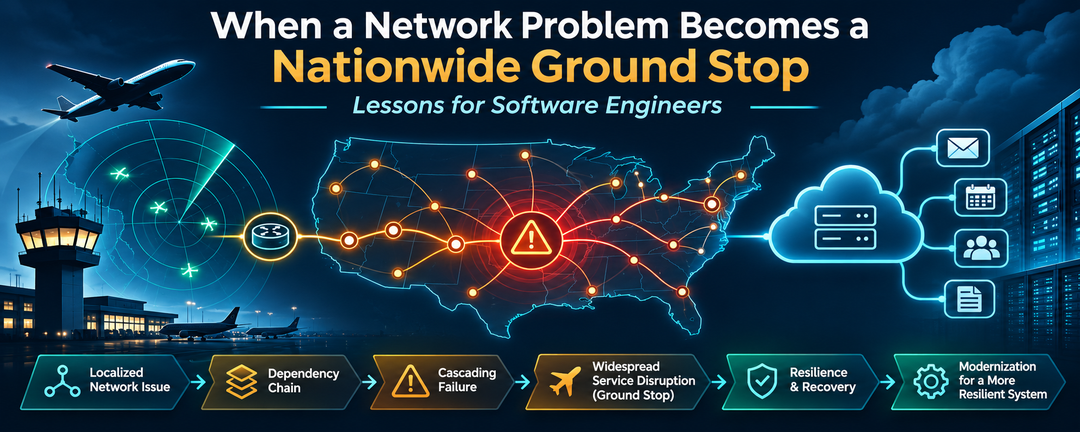
The November 2026 FAA and Microsoft 365 outages show why dependency mapping, failure isolation, and controlled recovery are essential to reliable system modernization.
On November 13, 2026, a telecommunications disruption destabilized air traffic control systems across the United States, prompting the Federal Aviation Administration (FAA) to issue a nationwide ground stop. Instability affected 17 of its 22 Air Route Traffic Control Centers and several terminal radar approach control facilities.
Some communications and radar capabilities remained operational. The FAA issued the ground stop as a precaution, and its network stabilized by approximately 8:15 p.m. Eastern. Departures resumed, but airlines continued working through delayed flights, cancellations, and disrupted schedules.
Beginning the previous day, a separate Microsoft 365 outage affected Exchange Online connectivity and dependent services. Microsoft’s preliminary findings described a connection-processing defect that allowed requests to accumulate until affected servers exhausted their capacity.
The incidents had different reported mechanisms, and there is no indication they were related. Both illustrate a shared engineering problem: a system’s response to abnormal behavior can determine whether a fault stays contained or becomes a wider disruption.
Modernization should reduce operational risk, not simply replace technology. For software engineers upgrading frameworks, changing infrastructure, or migrating to the cloud, that means verifying what happens not only when a new component works, but when it fails and when it recovers.
Two Outages, Shared Reliability Lessons
The FAA’s November 15 update reported excessive data flooding the legacy FAA Telecommunications Infrastructure (FTI) network at approximately 1,000 connection attempts every four to five seconds. The activity destabilized equipment supporting aircraft communications and radar feeds.
Investigators identified two potential originating sites: a radar facility in Amarillo, Texas, and a radio communications facility in El Dorado, Arkansas. L3Harris had been performing maintenance at El Dorado, including deploying a new router. According to the FAA, L3Harris blocked traffic from the two suspected locations, after which the network stabilized. The agency also reported disabling broadcasting functionality on approximately 60 similar routers as a precaution.
The precise root cause remained under investigation in the FAA’s November 15 statement.
Microsoft’s incident involved a different reported mechanism. Archived Microsoft service-health notices described network changes exposing a latent defect in systems establishing Exchange Online connections. Connection requests accumulated until affected servers exhausted processing capacity. When servers became unavailable, demand moved to remaining infrastructure. Some recovered servers became unresponsive again when traffic returned, making gradual restoration necessary.
Microsoft tracked the Exchange Online incident as EX1550543 and related Microsoft 365 impacts as MO1550821. The archive reports that Microsoft published post-incident reports on November 15, but it does not reproduce those documents. This analysis therefore attributes the technical description to the accessible incident updates, not to an independently reviewed final report.
Different failures, similar engineering concerns
| Engineering concern | FAA | Microsoft 365 |
|---|---|---|
| Change context | Maintenance involving a new router; cause still under investigation | Network changes exposed a latent connection-processing defect |
| Resource pressure | Excessive connection attempts destabilized legacy equipment | Requests accumulated as available processing capacity declined |
| Wider impact | Air traffic control communications and radar feeds | Exchange Online and dependent Microsoft 365 operations |
| Stabilization | Isolated suspected sources and disabled router functionality | Managed traffic and restored server capacity incrementally |
These observations do not prove that either organization lacked particular safeguards. They show why evaluating a change requires understanding shared dependencies, capacity, failure boundaries, and recovery behavior.
How Failures Propagate Through Dependencies
A cascading failure occurs when a problem in one component causes other components to become unavailable or degraded.
Imagine several applications communicating with a shared service. If it responds slowly, requests accumulate, consuming connections and worker capacity. As requests time out, clients may retry them, increasing demand against a dependency that is already constrained. Redirecting traffic from unhealthy servers can also overload remaining capacity.
This is a hypothetical distributed-system scenario, not a reconstruction of either outage.
Adding servers, deploying into multiple regions, or using containers does not automatically provide isolation. Services can still share one database, gateway, authentication system, or external API. Engineers need to identify those shared failure boundaries before introducing changes.
Reliability Risks During Modernization
A replacement component may connect successfully and pass functional tests while behaving differently under stress. A new SDK, gateway, database driver, or message broker may use different connection limits, timeout defaults, retry policies, or recovery behavior.
Successful connectivity is not the same as verified operational compatibility.
The replacement should be evaluated when its dependencies are unavailable, slow, saturated, and recovering. These checks matter for a .NET Framework application being modernized and for an application already running on modern .NET.
Five Practices for Containing Failures
1. Map dependencies and failure boundaries
Identify the applications, infrastructure, and business operations that depend on each changed component. Include indirect dependencies through shared resources. Determine which functions may degrade and which must remain available when a dependency fails.
2. Test abnormal conditions
Unit and integration tests establish functional correctness, not necessarily resilience. Exercise timeouts, dependency outages, connection surges, resource exhaustion, and recovery.
Failure Mode and Effects Analysis (FMEA) can help prioritize scenarios by their consequences. Define acceptable business behavior before executing each test.
3. Bound requests and resource use
Use timeouts, bounded retries, exponential backoff with jitter, circuit breakers, concurrency limits, and backpressure where appropriate. Each addresses a different failure mode.
Retry policies must consider the aggregate behavior of callers. A harmless-looking retry on one instance may become a surge when hundreds of instances execute it at once. Review retries across application code, SDK middleware, and infrastructure—not in isolation.
4. Deploy progressively
When possible, introduce changes to a limited scope before expanding them. Monitor request rates, dependency errors, resource utilization, and customer-facing operations.
Define stop conditions and test rollback or isolation procedures. Infrastructure changes may not always be safely reversible, so controlled degradation can be an important fallback.
5. Verify recovery under realistic demand
A recovered dependency may face waiting clients, reconnections, and a large backlog. Releasing everything at once can recreate overload. Controlled recovery testing should demonstrate that queued work resumes within agreed limits.
How Would We Apply These Lessons to a .NET Application Using Microsoft 365?
An application cannot control Microsoft 365 availability, but it can control how that dependency affects its own business operations.
Consider an ASP.NET Core order-processing API that writes orders to a relational database and uses Microsoft Graph to send confirmation messages through Exchange Online. This is a hypothetical architecture. Microsoft’s notices described potential impact to Graph requests accessing Exchange Online data, not proof that every sendMail request failed.
Decouple order acceptance from email delivery
If an API saves an order and then sends an email synchronously, a slow or unavailable notification service may delay the API response. A customer could receive an error after the order was committed and submit it again.
A more resilient design makes order acceptance independent of confirmation email delivery by using a transactional outbox. The order and an intent-to-send record are saved within the same database transaction. A separate worker processes the notification.
A simplified Entity Framework Core example is:
db.Orders.Add(order);

db.NotificationOutbox.Add(new NotificationOutboxMessage
{
    Order = order,
    Status = "Pending"
});

await db.SaveChangesAsync(cancellationToken);
This assumes a correctly mapped navigation property between the outbox and order entities. With a transactional database provider and default EF Core transaction behavior, changes saved through the same context in one SaveChangesAsync operation are atomic. See EF Core transactions.
Once that transaction commits, the API can confirm order acceptance without waiting for Microsoft Graph. The outbox records durable intent to send, not confirmation of delivery.
Track notification state and coordinate workers
The application needs explicit states to distinguish successful submission from an uncertain outcome.
| Application state | Meaning |
|---|---|
| Pending | Notification persisted and awaiting a worker |
| Processing | A worker has claimed it |
| Accepted | Microsoft Graph accepted the request, but delivery is not confirmed |
| Retry scheduled | Another attempt is permitted by policy |
| Unknown outcome | The application cannot establish whether Graph accepted it |
| Needs investigation | Automatic processing has stopped pending review |
These are application-defined states, not Microsoft Graph delivery statuses. Do not label a message Delivered without evidence appropriate to the business requirement.
A production outbox also needs an attempt count, next eligible attempt time, lease expiry, and correlation ID linking the notification to its business transaction.
In a multi-instance application, workers should coordinate claims using atomic updates, leases, or equivalent mechanisms. A lease can expire while a worker is still communicating with a provider, and a worker can fail after an external operation succeeds but before recording the outcome. Claim coordination alone does not guarantee exactly-once external effects.
Order creation also needs separate idempotency. For example, a client-supplied idempotency key enforced by a unique database constraint can prevent duplicate orders after repeated submissions. That does not make email submission idempotent.
Send email with Microsoft Graph
The following is an illustrative Microsoft Graph .NET SDK v6 request, referencing Microsoft.Graph 6.10.0. It assumes an authenticated GraphServiceClient, an authorized sending mailbox, a Mail.Send permission grant, and validated order data.
using Microsoft.Graph.Models;
using Microsoft.Graph.Users.Item.SendMail;

var request = new SendMailPostRequestBody
{
    Message = new Message
    {
        Subject = $"Order {orderNumber} confirmed",
        Body = new ItemBody
        {
            ContentType = BodyType.Text,
            Content = "Your order has been accepted."
        },
        ToRecipients = new List<Recipient>
        {
            new()
            {
                EmailAddress = new EmailAddress
                {
                    Address = customerEmail
                }
            }
        }
    },
    SaveToSentItems = true
};

await graphClient.Users[senderUserId]
    .SendMail
    .PostAsync(request, cancellationToken: cancellationToken);
The request explicitly sets SaveToSentItems = true, avoiding reliance on SDK serialization defaults. A sent copy can assist investigation; it is not proof of recipient delivery. This snippet is not the entire background worker.
Restrict mailbox permissions. An unrestricted application-level Mail.Send grant can authorize sending as users throughout a tenant. Consider Exchange Online RBAC for Applications to scope access to an approved notification mailbox. Review any separate Microsoft Entra permission grants that might also authorize broader access.
Handle retries without amplifying failures
Microsoft’s Graph throttling guidance instructs clients to honor Retry-After when throttled. The Graph SDK includes retry middleware for supported unsuccessful responses.
An HTTP response eligible for retry does not establish that repeating an operation with external side effects is safe. Sending an email can have a visible effect even when the calling application does not receive a definitive response.
Applications must understand both SDK-level and worker-level retries. For operations whose outcome is uncertain, the worker may need to stop automatic resubmission and record an Unknown outcome state.
The Microsoft Graph .NET SDK includes a built-in HTTP retry handler with a configurable MaxRetry setting. Setting MaxRetry = 0 disables automatic retries performed by that handler. The application must then handle Retry-After responses, backoff scheduling, and aggregate request limits itself. Verify the retry configuration against the SDK version used by the application.
Acceptance is not delivery
The Microsoft Graph sendMail API returns HTTP 202 Accepted after accepting a submission. It does not guarantee message delivery.
If a response is lost after Graph accepts the request, the caller may not know whether the email was submitted. Blind resubmission may create duplicates. An outbox prevents loss of the intent to notify but does not establish exactly-once delivery by the provider.
For stronger traceability, applications can alternatively create a draft message, store its identifier, and send that draft in a separate operation. Microsoft’s immutable ID guidance describes how identifiers can support later lookup in Sent Items. A missing draft alone is not proof of successful submission, and a sent copy is not proof the recipient received it. The draft workflow introduces additional API calls and mailbox read/write permissions.
Recover without creating another overload
During an extended Microsoft 365 disruption, the application may continue accepting orders while notifications accumulate in the outbox.
When connectivity returns, workers should not immediately process every pending message at maximum speed. They should drain the backlog at a controlled rate, respecting throttling and concurrency limits.
The following scenarios can become automated resilience tests.
| Failure scenario | Expected behavior | Measurement |
|---|---|---|
| Microsoft 365 unavailable | Orders accepted; notifications persisted | Committed orders, outbox count, API latency |
| Request times out | Attempts bounded; ambiguous results recorded | Attempt count, elapsed time, notification state |
| Graph returns HTTP 429 | Worker follows documented throttling policy | Retry-After, request rate, throttled responses |
| Workers compete for work | Claims coordinated; duplicate risks handled | Active claims, conflicts, lease expiration |
| Queue accumulates | Capacity and overflow rules enforced | Queue depth, oldest item age, growth rate |
| Service returns | Backlog drains at a controlled rate | Concurrency, throughput, drain time |
| Acceptance uncertain | Investigation policy followed; orders stay unique | Audit trail, idempotency records, duplicate reports |
Set numerical thresholds from business and technical requirements. The objective is not merely to keep the application running; it is to preserve accepted transactions while containing and recovering from a dependency failure.
Infrastructure Restoration vs. Business Recovery
The FAA lifted its ground stop once the network stabilized, but airlines still had to recover interrupted schedules.
Microsoft’s incident updates similarly described continuing to process queued email during recovery. The archived notices report an extension of the email timeout window to 48 hours to help protect delayed messages—not to guarantee delivery. See the Microsoft 365 incident history.
That distinction matters for applications, too:
| Recovery stage | Verification |
|---|---|
| Infrastructure restoration | Failed dependencies respond and remain stable |
| Application restoration | Dependent processing resumes within acceptable limits |
| Business recovery | Pending work is reconciled, data is correct, and customer-facing obligations are met |
For the order-processing application, business recovery includes draining eligible notifications, investigating uncertain submissions, and verifying that accepted orders remain correct.
Recovery is complete when expected business outcomes have been restored, not merely when infrastructure responds again.
What Does This Mean for Legacy Application Modernization?
The GAO reported in September 2024 that 51 of 138 assessed FAA air traffic control systems were unsustainable, with another 54 potentially unsustainable. Those earlier findings do not establish the cause of the November 2026 disruption.
At a November 14 DOT briefing, Secretary Sean Duffy described work to replace aging copper telecommunications connections with fiber and transition from time-division multiplexing (TDM) to IP communications. At the same briefing, FAA Administrator Bryan Bedford stated that the equipment replacement was routine maintenance of the existing network, distinct from the separately funded $12.5 billion modernization program. The FAA reiterated that distinction on November 15; the precise root cause remained under investigation in that update.
Both kinds of work involve introducing change into interconnected systems with long-standing operational assumptions.
The same risks exist when moving from .NET Framework to modern .NET, adopting SDK-style projects, introducing containers, or migrating to cloud infrastructure. Those changes can improve maintainability, but they do not automatically contain failures.
Dependency inventories, automated tests, observability, durable processing, and recovery procedures can be established before changing frameworks or hosting environments. They provide a technical baseline for determining whether modernization actually improves reliability.
For a complementary approach to customer impact and failure prioritization, see Learning from Outages: Protecting Services and Customers, covering dependency analysis, FMEA, and controlled recovery testing.
Modernization Should Reduce Risk, Not Simply Replace Technology
The FAA and Microsoft incidents involved different systems and different reported failure mechanisms. Both show why shared dependencies, capacity, failure boundaries, and recovery deserve attention when systems change.
Before the next modernization effort, choose one component scheduled for replacement. Map what depends on it, identify what must remain available when it fails, and define measurable recovery tests.
A successful deployment demonstrates that a component can operate. Resilience testing establishes whether the larger system can tolerate that component failing, becoming overloaded, or recovering under demand.