If you have tried to execute the following code on windows azure then no doubt you have run into a security violation. In fact if you try and run the same example on your local machine you will also get the same error as creating an custom event source on windows requires that it be performed by an Administrator.
if(!EventLog.SourceExists("MyCustomSource"))
{
	EventLog.CreateEventSource("MyCustomSource", "Application");
}
In order to create a custom event source in windows azure do the following:
1) Create a cmd script using notepad with the following content
EventCreate /L Application /T Information /ID 900 /SO "MyCustomSource" /D "Custom source for logging my custom events"

Here are the options for EventCreate.exe /?
 EVENTCREATE [/S system [/U username [/P [password]]]] /ID eventid
    [/L logname] [/SO srcname] /T type /D description

Description:
    This command line tool enables an administrator to create
    a custom event ID and message in a specified event log.

Parameter List:
    /S    system           Specifies the remote system to connect to.

    /U    [domain\]user    Specifies the user context under which
    the command should execute.

    /P    [password]       Specifies the password for the given
    user context. Prompts for input if omitted.

    /L    logname          Specifies the event log to create
    an event in.

    /T    type             Specifies the type of event to create.
    Valid types: SUCCESS, ERROR, WARNING, INFORMATION.

    /SO   source           Specifies the source to use for the
    event (if not specified, source will default
    to 'eventcreate'). A valid source can be any
    string and should represent the application
    or component that is generating the event.

    /ID   id               Specifies the event ID for the event. A
    valid custom message ID is in the range
    of 1 - 1000.

    /D   description      Specifies the description text for the new event.

    /?                     Displays this help message.
2) In your windows azure web role create a folder called Startup and place the CMD file created above in it
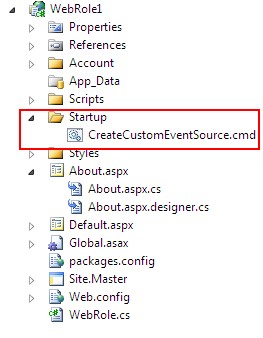
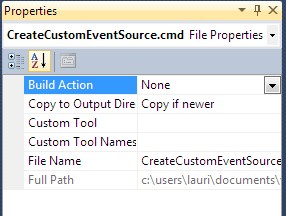
3) Right click on the cmd file in solution explorer and select properties and set the “Copy to output directory” to “Copy if newer”
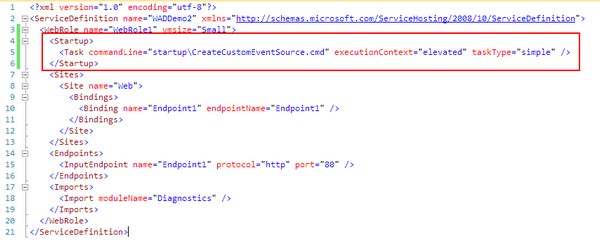
4) Open the ServiceDefinition.csdef file and add the startup section as shown below.
Finished. Now wasnt that simple ;-)
Ok, so now you no longer need code that checks if it exists as that will throw a security exception. Now you just write to the EventLog as usual but now using your new custom source.
EventLog.WriteEntry("MyCustomSource", "This is my event log message");
I also want to give credit to Walter Mayers for pointing out the cmd script approach to creating the custom event source. The original MSDN blog post is no longer online.